Music Player & MP3 - MMusic
- 4.7
- Rating
- 10.00M
- Installs
- Free
- Price

 Analysis by App-foxy
I like music players that stay out of the way. When I want to listen to files already on my phone, I do not necessarily want recommendations, social features, video clips, or a subscription screen competing with the music. Music Player & MP3 - MMusic takes that simpler route. It is a free music and audio app from ICC Tech, built around offline playback rather than online discovery.
After spending time with it, my overall view is straightforward: this is a practical choice for people who keep their own music library and want a lightweight player for everyday listening. Its appeal is not that it tries to replace every music service. Its appeal is that it focuses on local playback and keeps the basic job clear. That focus also creates its main limitation: anyone expecting a full streaming platform, a large catalog, or sophisticated music-management tools may find the experience too narrow.
The app has reached over ten million installs and holds a 4.7 average from around sixty-nine thousand ratings, which gives it a strong level of visible user approval. Those figures do not make it perfect, but they do suggest that its uncomplicated approach works for a substantial audience. I would recommend it most readily to someone who has MP3 files on an Android device and wants to play them without depending on a mobile connection.
You May Also Like

 Blood Strike: 2.5 Anniversary
Blood Strike’s Loadouts Turn Every Drop Into a Tactical Gamble
A close look at Blood Strike’s custom loadouts: how fast access to signature weapons reshapes its battle royale rhythm, rewards preparation, and narrows the gap between fights.

 Pandora - Music & Podcasts
Pandora’s Music Is Easy to Start, but Harder to Recover
Pandora’s strength is its low-effort path from a seed to a station. Its weak spot is how much confidence it asks you to place in connection, setup, and quiet recovery.

 8 Ball Pool
 Is Built on Rivalries, Rematches, and Routine
A close look at the rivalries, rematches, shared routines, and unanswered safety questions that turn a quick pool match into a persistent mobile community.

 Samsung Music
’s Quiet Strength Is Playing What You Already Own
Its reach comes less from spectacle than from dependable access to a personal library. That simplicity is both the app’s strongest retention engine and its ceiling.

 AccuWeather: Weather Radar
AccuWeather Review: A Quick, Clear Forecast for Everyday Decisions
For everyday plans, the best forecast is the one you can understand quickly. AccuWeather makes rain timing, radar, and local conditions easy to act on, with a few trade-offs.

 Hill Climb Racing
Why Hill Climb Racing Still Turns Crashes Into One More Run
A tiny car, a bumpy hill and one more upgrade: Hill Climb Racing keeps resurfacing because its simple chaos makes every near-miss feel personal.
More From Our News Desk



What makes MMusic useful in daily listening
I find MMusic most useful when I plan around the music I already have: a commute playlist, a few albums for a trip, or familiar tracks for a task where I do not want to browse. A small, deliberately chosen collection can make offline listening feel effortless, while also keeping storage and file organization manageable. That everyday role helps clarify where this focused player earns its place—and where another kind of music app may suit you better.
A focused offline player rather than another streaming service
The first thing to understand is the role this app plays. Music Player & MP3 - MMusic is not the kind of service I would open to search for a new artist or build a playlist from a cloud catalog. Its store summary presents it as a way to play music offline without limits, and that purpose shapes the experience. The useful question is not “How large is its catalog?” but “Do I already have the tracks I want to hear?”
For locally stored music, that distinction matters. An offline player can be more dependable than a streaming app when I am travelling, trying to save mobile data, or listening somewhere with unreliable reception. It also suits people who have collected MP3 files over the years, transferred music from a computer, or prefer to manage their own library instead of renting access to one.
I find this especially convenient for repeat listening. If I have a folder of albums, language lessons, downloaded mixes, or personal recordings, a local player gives those files a direct place to live. I do not need to search through an online service or remember whether a particular track is available in my region. The trade-off is that the quality of the experience depends heavily on how tidy and complete my own music collection is.
Why the offline focus can be a real advantage
There is a practical benefit to separating music playback from internet access. Before a trip, I can prepare the files I expect to use and then listen without treating every song as a data request. That is useful on public transport, during flights, in rural areas, or at home when I want to reduce background network activity. It also makes the app a sensible companion for older devices where a large streaming application may feel excessive.
One of my favorite ways to use a player like this is to create a small “current rotation” folder rather than rely on a huge library. I can keep a few albums, workout tracks, or calming pieces together, then use the app as a focused listening tool. This avoids the common problem of spending more time browsing than actually listening. MMusic works best when I treat it as a straightforward shelf for music I have already chosen.
Another useful workflow is keeping separate collections for different situations. A commute folder can contain short, energetic tracks; a study folder can contain longer instrumental pieces; and a travel folder can hold music that I know will work offline. This is not a glamorous feature, but it is the kind of habit that makes a local player more useful than its short description suggests. The app becomes easier to live with when I organize the files before opening it.
What I noticed about the everyday experience
The biggest strength is clarity. I am not approaching the app as a social network or a discovery engine, so I can focus on selecting music and pressing play. That makes it suitable for listeners who already know what they want. It is also less distracting for people who use music as background sound while reading, cooking, commuting, or working.
For someone moving from a streaming service, the adjustment is important. With a streaming subscription, the service usually handles discovery, storage, recommendations, and catalog maintenance. With MMusic, I am responsible for bringing the music to the device. That extra responsibility is not automatically a flaw, but it changes the routine. The app can play my collection; it cannot replace the process of finding and obtaining the files I want.
This is also where expectations need to stay realistic. The phrase “offline” does not mean I can search the internet for any song and immediately play it. It means the player is suited to music that is already available on the device. If I want new releases, algorithmic mixes, podcasts from a large online directory, or synchronized libraries across several devices, a streaming alternative will usually be more convenient.
Useful habits for getting more from a local library
My first recommendation is to clean up file names before importing a large collection. Consistent artist and album information makes browsing much less frustrating than a folder full of vaguely named tracks. I would also test a small group of files first rather than copying an entire archive at once. That approach makes it easier to identify missing artwork, inconsistent tags, or tracks that I no longer want on the phone.
A second tip is to keep a separate backup of the music. An offline player is not a backup system. If I remove files from the device, change phones, or lose storage, the player cannot restore them by itself. Keeping the original collection on a computer or another safe location protects the investment of time involved in organizing it.
A third trade-off concerns storage. Offline listening avoids streaming data, but the files still occupy space on the phone. I would reserve room before transferring a large library, especially if the device also stores photos and videos. A small, carefully selected collection often gives a better experience than filling the phone with tracks I rarely play.
Where the app fits beside familiar alternatives
Compared with a major streaming service, MMusic is more independent and less useful for discovery. A streaming app is the better choice when I want instant access to a broad online catalog, personalized suggestions, collaborative playlists, or listening that follows me across devices. Those services also reduce the work of organizing files, although they may introduce subscriptions, account requirements, or online dependence.
Compared with a basic phone file manager, MMusic should be more natural for listening because it is designed specifically around music playback. A file manager can open an audio file, but it is not normally the place I want to browse a collection for an evening of listening. The dedicated category matters: the app gives music its own space rather than treating tracks as ordinary documents.
Compared with a more advanced audio player, however, the choice becomes less obvious. Enthusiasts who care about detailed audio controls, extensive tag editing, unusual formats, or highly customized playback may prefer a specialist tool. I would not choose MMusic solely because I want the deepest possible technical control. I would choose it because I want a simple offline player and do not need a long list of expert settings.
The limitation that matters most
The central weakness is not that the app is too simple; it is that simplicity may be mistaken for completeness. If my music life depends on online access, MMusic will not be the best primary app. I would still need another service for music discovery and a separate process for obtaining tracks. That can feel fragmented compared with opening one streaming app and finding almost everything in one place.
There is also a learning curve for people who have never managed local music. New users may wonder why a song is not appearing, only to discover that the file is stored elsewhere, named unexpectedly, or not yet copied to the phone. This is a library-management issue rather than a dramatic defect, but it affects the first impression. The app is easiest for someone comfortable with the idea that their files are the source of the collection.
Storage management is another practical concern. Offline playback is excellent when I have enough room and have planned ahead, but it is less convenient when I constantly need to delete files to make space. Streaming services shift much of that burden to the provider. MMusic gives me more direct control, yet direct control means more responsibility.
I would also skip it as my only music app if I expect a complete entertainment hub. People who listen mainly to online radio, podcasts, music videos, or newly released albums will likely feel that the app does not cover their main habits. Its strengths become weaknesses when the listener wants variety supplied by a service rather than a collection maintained personally.
Who should install it
I think MMusic is a strong fit for several specific listeners. It suits someone with a personal MP3 collection, a traveler preparing music before leaving home, a user trying to avoid streaming data, or a listener who wants a quiet player without the pressure to discover something new. It can also work well for people using an older Android phone, since the minimum operating-system requirement is Android seven or later.
It is particularly appealing if I value ownership of my listening routine. I decide which files are present, which albums stay on the device, and what I hear when I go offline. That can feel more stable than relying on availability inside an online catalog. It is also a good match for anyone who wants to keep a small, intentional library instead of carrying an enormous selection.
I would be more cautious about recommending it to a family member who wants effortless access to current music. That person may be happier with a streaming platform where searching, recommendations, and catalog updates are built into the same service. I would also point audio hobbyists toward a more specialized player if they need advanced sound customization or detailed library tools.
Cost, maturity, and what to expect from the current release
The app is free to install, which makes it easy to test with a small collection before committing to a new listening routine. It includes optional in-app purchases ranging from ninety-nine cents to five dollars and ninety-nine cents per item. I would approach those purchases as something to evaluate inside the app rather than assuming they are necessary for basic playback. The free entry point is one of its practical advantages for someone who simply wants to see whether local listening fits.
MMusic was released on September second, twenty twenty-four, and the current version is 2.1.4. That gives readers a useful point of reference when comparing their own experience with older discussions or screenshots. The developer is ICC Tech, and the app carries a Teen content rating. In ordinary use, the most important takeaway is that this is a relatively recent, actively presented music-player option rather than an old utility that has disappeared from attention.
The public response is encouraging, with around one thousand written reviews alongside its broader rating total. I would still treat ratings as a starting point, not a guarantee that every phone or library will behave identically. Local music collections vary widely, and the app’s usefulness depends on file organization, available storage, and whether offline playback is actually the listener’s priority.
My practical recommendation before making it your main player
I would begin with a small test library: a couple of albums, a playlist for a regular commute, and a few tracks with different file names. I would then check whether the browsing experience feels natural and whether the app fits the way I already organize music. This is a better test than importing everything immediately, because it reveals whether the player matches my habits without creating a cleanup job.
Next, I would prepare for the offline situations that matter most. If I want music for a trip, I would copy the files before leaving and play them once while still at home. That confirms that the tracks are available locally and prevents an avoidable surprise when I no longer have a reliable connection. I would also keep a backup of anything difficult to replace.
Finally, I would decide whether I need one app or two. MMusic can be the offline side of a broader setup, while a streaming service handles discovery and new releases. There is no rule saying one player must do everything. In my experience, accepting that division makes the app more satisfying, because I judge it on the job it is actually designed to perform.
My verdict for offline music listeners
Music Player & MP3 - MMusic succeeds because it understands a real need: sometimes I just want to play music that is already on my phone. Its free starting point, offline focus, clear purpose, and strong public rating make it worth trying for Android users with a personal collection. I especially like it for planned listening, travel, limited connectivity, and distraction-free background music.
Its weakness is equally clear. It does not make local files feel like a full streaming ecosystem, and it should not be judged as though it were one. People who want discovery, online catalogs, synchronized listening, or advanced audio controls may be better served elsewhere. The app asks me to manage my own files, and that is either a welcome bit of control or an unnecessary chore depending on my habits.
My final recommendation is simple: install it if your music is already yours and stored locally. Start with a small, organized collection, test your everyday routine, and keep a streaming alternative if discovery matters to you. For the right listener, MMusic is not trying to be everything; it is a focused offline player that can make personal music feel direct and dependable.
FAQs for Music Player & MP3 - MMusic
01What features does Music Player & MP3 - MMusic offer?
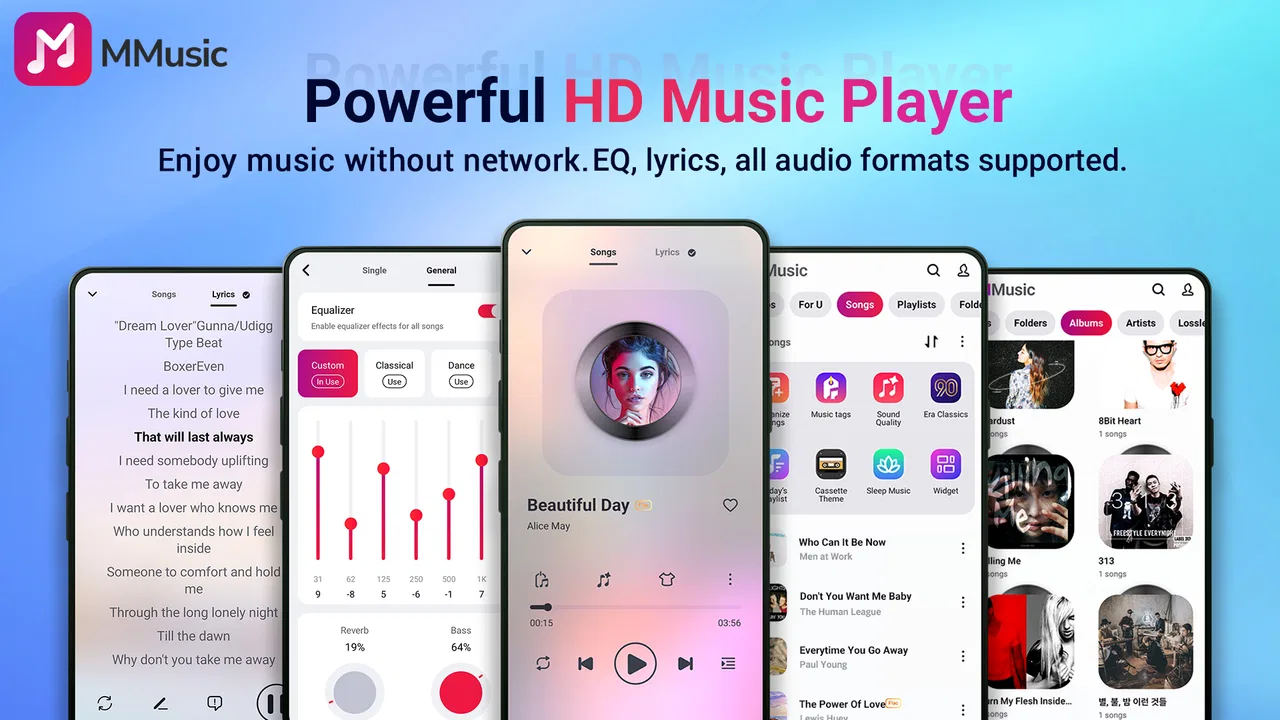
Music Player & MP3 - MMusic is packed with features like customizable playlists, an equalizer with multiple presets, and support for all major audio formats. It also offers offline playback, sleep timer settings, and a user-friendly interface. The app supports gapless playback and provides a visually appealing album art display.
02Is Music Player & MP3 - MMusic free to use?
Yes, Music Player & MP3 - MMusic is free to download and use. However, it may contain in-app purchases or advertisements. Premium features, such as ad-free experience or advanced audio effects, might require a subscription or one-time purchase. Check the app store listing for detailed pricing information.
03Can I use Music Player & MP3 - MMusic offline?
Absolutely. Music Player & MP3 - MMusic supports offline playback, allowing you to listen to your favorite tracks without an internet connection. Simply download or transfer songs to your device, and the app will play them directly from your local storage. This is ideal for conserving data or when you're on the go.
04Does Music Player & MP3 - MMusic support custom playlists?
Yes, the app allows you to create and manage custom playlists effortlessly. You can organize your music by genre, artist, mood, or any custom category you prefer. The intuitive drag-and-drop interface makes it easy to add or remove songs, ensuring your playlists are always perfect for any occasion.
05Is Music Player & MP3 - MMusic compatible with both Android and iOS?
Music Player & MP3 - MMusic is compatible with both Android and iOS devices. The app is designed to seamlessly integrate with each platform's unique features, offering a consistent and user-friendly experience across all devices. Be sure to download the correct version from the Google Play Store or Apple App Store.
Pros
- User-friendly interface for easy navigation.
- High-quality audio playback options.
- Supports a wide range of audio formats.
- Customizable equalizer settings.
- Offline listening feature available.
Cons
- Contains ads that can interrupt usage.
- Limited free features without subscription.
- Occasional crashes reported by users.
- No cloud storage integration.
- Lacks advanced playlist management.

Music Player & MP3 - MMusic
Gallery